

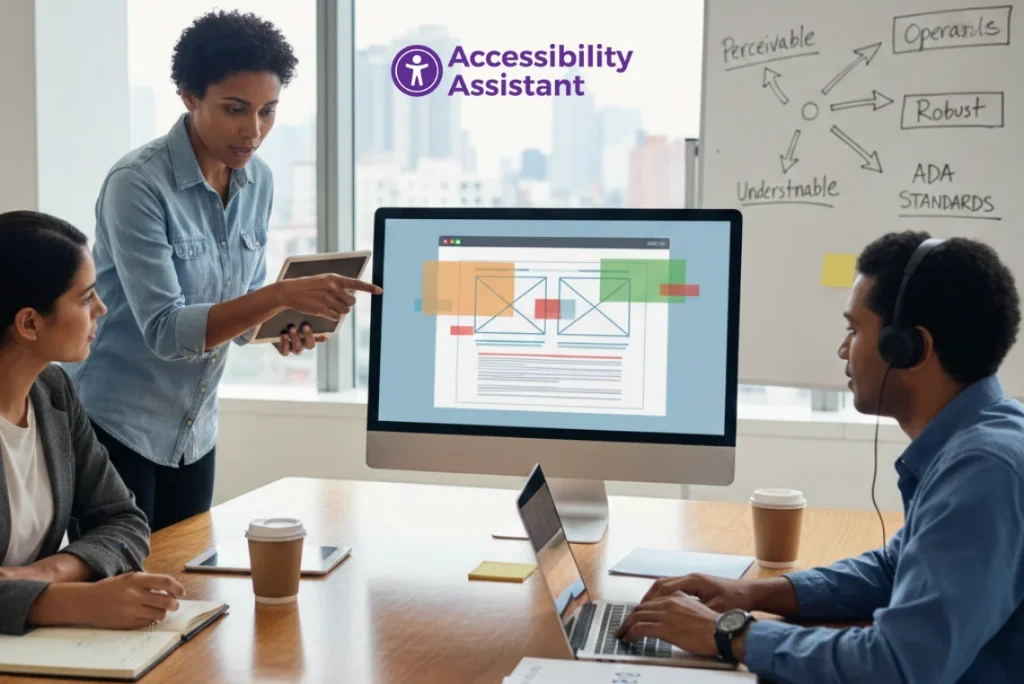
An ADA compliance audit is a structured process that helps organisations identify and fix accessibility barriers that prevent people with disabilities from using a website effectively. As digital accessibility enforcement increases and WCAG 2.2 becomes the most referenced standard in legal and compliance reviews, businesses can no longer rely on assumptions or one-time checks.
A proper audit connects ADA legal obligations with WCAG technical requirements, ensuring that a website is usable, compliant, and defensible in case of regulatory or legal scrutiny.
This guide explains what an ADA compliance audit involves, how WCAG standards are applied, which tools and methods work best, and how teams should prioritise fixes after the audit.
What Is an ADA Compliance Audit?
An ADA compliance audit is a formal review of a website to determine whether it provides equal access to users with disabilities, as required under the Americans with Disabilities Act (ADA), particularly Title III, which applies to public-facing businesses.
While the ADA itself does not define technical rules for websites, courts, regulators, and settlement agreements consistently reference WCAG (Web Content Accessibility Guidelines) as the technical benchmark for evaluating compliance.
An ADA audit typically evaluates whether users with visual, auditory, motor, or cognitive limitations can:
- Read content clearly
- Navigate using a keyboard or assistive technology
- Complete forms and transactions
- Access media and documents
- Interact with dynamic components
A strong audit goes beyond surface-level checks and focuses on real usability barriers, not just code errors.
Why WCAG Standards Matter in an ADA Compliance Audit
WCAG provides the technical framework that translates ADA’s legal requirement for equal access into measurable success criteria.
WCAG Principles (POUR)
WCAG is based on four core principles:
- Perceivable – Content must be visible or audible
- Operable – Users must be able to navigate and interact
- Understandable – Content and interactions must be clear
- Robust – Content must work with assistive technologies
Which WCAG Version Applies?
Most ADA compliance audits today reference WCAG 2.1 or WCAG 2.2 at Level AA. WCAG 2.2 adds stronger requirements for:
- Focus visibility
- Target size
- Dragging interactions
- Consistent navigation
In practice, WCAG acts as the technical enforcement layer for ADA website compliance.
WCAG standards continue to evolve as accessibility requirements become more formalised worldwide. One important update is the ISO approval of WCAG 2.2, which strengthens its role as a globally recognised accessibility framework. For teams conducting an ADA compliance audit, understanding this approval helps clarify why WCAG 2.2 is increasingly referenced in audits, policies, and compliance reviews. It also reinforces the importance of aligning technical testing with internationally accepted accessibility standards.👉 What WCAG 2.2’s ISO approval means for web accessibility
ADA Compliance Audit Checklist (Step-by-Step Process)
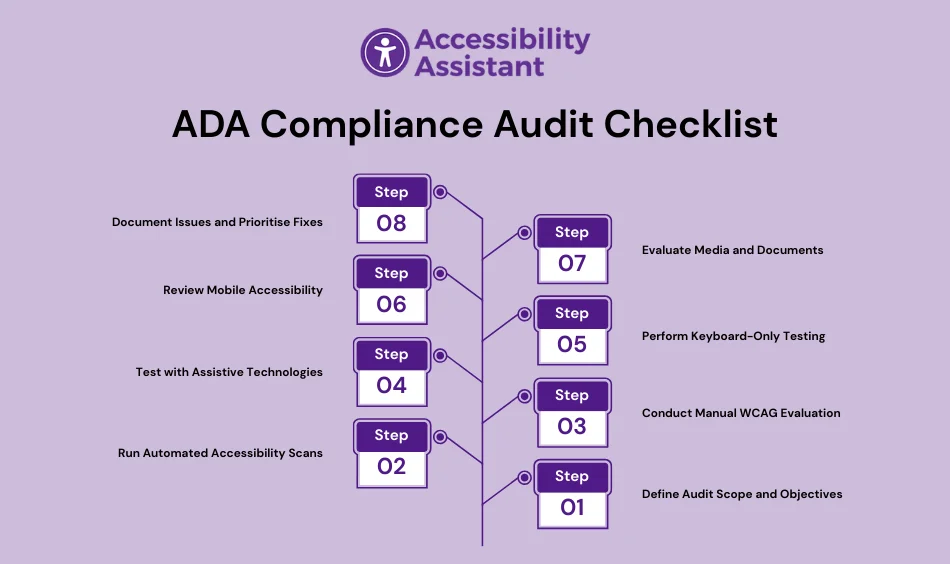
This checklist is structured to reflect how professional accessibility teams conduct audits and how courts evaluate compliance.
Step 1: Define Audit Scope and Objectives
Before testing begins, clarify:
- Which pages and templates are included
- Critical user journeys (checkout, sign-up, contact, login)
- Desktop and mobile coverage
- Third-party tools or embedded content
This step prevents incomplete audits and missed risks.
Step 2: Run Automated Accessibility Scans
Automated tools help identify common WCAG failures quickly, such as:
- Missing alt text
- Low colour contrast
- Empty buttons or links
- Improper landmarks
- Basic ARIA errors
Recommended tools include:
- Accessibility Assistant
- Axe DevTools
- WAVE (WebAIM)
- Google Lighthouse
Automated scans usually detect 20–30% of real issues, so they are only the starting point.
Step 3: Conduct Manual WCAG Evaluation
Manual testing uncovers issues that automation cannot reliably detect.
Key checks include:
- Heading hierarchy and reading order
- Keyboard navigation and focus behaviour
- Visibility of focus indicators
- Link and button clarity
- Colour-dependent instructions
- Error handling and form logic
Manual review is essential for meaningful ADA compliance.
Step 4: Test with Assistive Technologies
Assistive technology testing validates real user experiences.
Tools commonly used:
- NVDA (Windows)
- JAWS (Windows)
- VoiceOver (macOS and iOS)
- TalkBack (Android)
Focus on:
- Screen reader announcements
- Logical navigation order
- Interaction with forms and modals
- Feedback for dynamic updates
This step is critical for legal defensibility.
Step 5: Perform Keyboard-Only Testing
Users with motor impairments rely on keyboards.
Verify that users can:
- Tab through all interactive elements
- See where the focus is at all times
- Open and close menus and modals
- Submit forms
- Escape pop-ups
Keyboard traps are a common ADA audit failure.
Step 6: Review Mobile Accessibility
Mobile accessibility is now a major audit requirement.
Check for:
- Adequate touch target size
- Orientation support
- Zoom and scaling behaviour
- Gesture alternatives
- Mobile screen reader compatibility
WCAG 2.2 strengthens expectations in this area.
Step 7: Evaluate Media and Documents
Content formats are often overlooked.
Audit for:
- Captions on videos
- Transcripts for audio
- Tagged PDFs
- Logical reading order
- Alt text inside documents
Inaccessible documents frequently appear in ADA complaints.
Step 8: Document Issues and Prioritise Fixes
A strong ADA compliance audit report includes:
- Clear issue descriptions
- WCAG references
- Severity and user impact
- Affected pages
- Suggested remediation
Expert Recommendation Prioritisation Table
| Issue Type | Severity | Impact |
| Keyboard navigation | High | Blocks access |
| Low colour contrast | High | Prevents readability |
| Missing labels | High | Breaks forms |
| Heading errors | Medium | Confuses navigation |
| Media captions | Medium | Limits content access |
Most Common Issues Found in ADA Compliance Audits

Across industries, audits repeatedly identify the same failures:
- Low colour contrast
- Missing or incorrect alt text
- Poor heading structure
- Inaccessible forms
- Missing focus indicators
- Keyboard traps
- Unannounced dynamic content
- Media without captions
- Improper ARIA usage
These issues appear on e-commerce sites, SaaS platforms, healthcare portals, educational websites, and government services.
ADA Audit vs Web Accessibility Audit
Although closely related, these audits serve different purposes.
| Audit Type | Focus |
| ADA compliance audit | Legal risk, equal access |
| Web accessibility audit | Technical WCAG validation |
An ADA compliance audit typically uses WCAG standards to validate legal accessibility expectations.
Tools Used During an ADA Compliance Audit
Effective audits combine tools and manual review.
Automated Tools
- Accessibility Assistant
- Axe DevTools
- WAVE
- Lighthouse
Manual Testing
- Keyboard navigation
- Screen readers
- Visual inspection
Ongoing Monitoring
- Scheduled scans
- CI/CD testing
- Regression checks
No single tool guarantees compliance.
Post-Audit Best Practices
An audit is not the end of the process.
To maintain compliance:
- Integrate accessibility into design systems
- Train designers, developers, and content teams
- Test updates before release
- Monitor accessibility continuously
- Repeat audits quarterly or after major changes
Accessibility should be part of standard development workflows.
Industry-Specific ADA Audit Considerations
Different industries face different risks:
- E-commerce: checkout, filters, product images
- Healthcare: forms, portals, patient documents
- Education: video content, PDFs, learning platforms
- Government: forms, navigation, document libraries
- SaaS: dashboards, dynamic interfaces
Audit scope should reflect industry-specific usage.
Frequently Asked Questions About ADA Compliance Audits
1. What is an ADA audit?
An ADA audit is a structured review of a website to identify accessibility barriers that prevent people with disabilities from using digital content. It evaluates whether a website meets accessibility expectations under the Americans with Disabilities Act, typically using WCAG standards as the technical benchmark.
2. What does ADA mean in auditing?
In auditing, ADA refers to assessing whether a website provides equal access to users with disabilities, as required by the Americans with Disabilities Act. An ADA audit focuses on usability, navigation, content access, and interaction for users who rely on assistive technologies.
3. What is ADA compliance?
ADA compliance means ensuring that websites, applications, and digital services are accessible to people with disabilities. For websites, this includes readable text, keyboard navigation, accessible forms, proper colour contrast, captions for media, and compatibility with screen readers.
4. What is ADA compliance testing?
ADA compliance testing is the process of evaluating a website using automated tools, manual WCAG checks, keyboard testing, and assistive technology testing to identify accessibility issues. The goal is to confirm that the website meets ADA expectations and WCAG accessibility standards.
5. What are the four types of audits?
The four commonly referenced audit types include:
- Compliance audits (legal and regulatory requirements such as ADA)
- Accessibility audits (WCAG-based usability and access checks)
- Technical audits (code, performance, and structure)
- UX audits (usability and user experience evaluation)
An ADA compliance audit typically combines compliance and accessibility auditing methods.
Conclusion
An ADA compliance audit is the most reliable way to identify accessibility risks and align legal requirements with WCAG technical standards. By combining automated testing, manual WCAG evaluation, assistive technology checks, and clear prioritisation, organisations can create accessible, compliant digital experiences.
Accessibility is not a one-time task. Ongoing audits, structured workflows, and continuous monitoring are essential for maintaining compliance as websites evolve.
When done correctly, an ADA compliance audit reduces legal exposure, improves usability, and supports inclusive access for all users.